


Camera for Android
4.85.44K Reviews
App Specs
- Version
- 6.8.0
- Updated On
- License
- Free
- Downloads
- 50,000,000+
- Developer
- Litter Penguin
- Categories
- Photography
- Platform
- Android
Screenshots
 Analysis by AppCompare
I judge a camera app by what happens between noticing a moment and having a photo I can actually use. Camera for Android, made by Litter Penguin, is aimed at people who want to open the camera and get on with taking pictures rather than spend time choosing among a stack of tools. It is a free photography app, rated for Everyone, and its straightforward premise makes sense for everyday snapshots as well as more deliberate attempts at a good image.
Starting with the phone you already have
The first thing to keep in mind is that a camera app works alongside the phone’s camera hardware. The experience and the final image can depend on the device, so I would treat modes and controls as ways to work with the camera, not as a promise that every phone will produce the same result. That matters if you are comparing photos with a newer handset or expecting software to fix difficult lighting by itself.
The app has been available since 2014, and its current version is 6.7.8. Its long-running presence is reflected in a 4.8 average from around 362,000 ratings and more than 50 million installs. Those figures suggest a lot of people have found it useful, but I would still decide based on whether its simple camera-first approach suits the way you shoot.
A practical capture routine
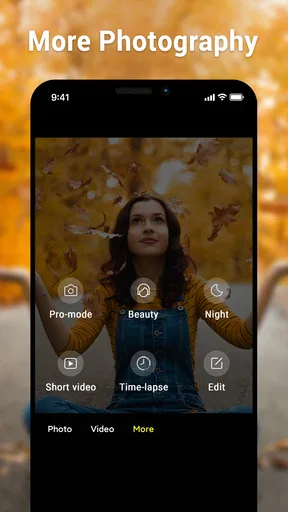
For a quick photo, my preferred routine is simple: open the camera, check the framing, take a test shot if the light is tricky, and then capture the moment. That small pause is more useful than immediately changing every setting. If a scene has bright windows and dark interiors, HDR is worth trying; for a person against a distracting background, portrait mode may help draw attention to the subject; and in dim conditions, night mode is the obvious option to test.
These modes are best treated as choices, not automatic upgrades. HDR can be useful when a scene contains both bright and shadowed areas, but a moving subject may make a more straightforward shot the safer choice. Portrait effects are most convincing when the subject is clearly separated from the background. Night shots also benefit from a steady hand and a moment to hold still. Taking one quick comparison photo before committing is an easy way to spot when a mode is helping rather than merely changing the look.
Controls for a more deliberate shot
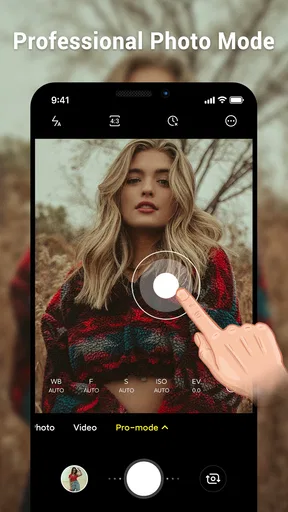
When I want more than a fast snapshot, the manual adjustments make the app more interesting. ISO, shutter speed, and white balance give you ways to respond to the scene instead of relying entirely on the camera’s automatic choices. For example, white balance can help when indoor lighting makes a photo look too warm, while a slower shutter can brighten a static subject if I can keep the phone steady.
There is a trade-off: extra control is useful only when you have time to use it. A moving child, a passing pet, or a moment that will not repeat is usually a poor time to experiment with several settings. The app remembers the last settings, which saves setup time for planned shooting, but it also means I would check those settings before an unexpected snapshot. A previous manual choice may not suit a new scene.
Worth Reading Before You Choose

Baby Panda World Brings Quick Play to Modern Phones, but Its Game Library Feels Busy

ESPN’s Live Game View Makes Following Close Games Easier

QuizzLand Review: A Good Fit for Short Trivia Breaks, Not Every Player

Basketball Stars: Multiplayer Is Fast, but Can It Recover When Matches Go Wrong?

WEBTOON Turns Phone Updates Into a Better Reading Routine

Link to Windows Runs on Shared Habits, Not Social Feeds
Getting the image to the next step
After capture, the useful question is what you plan to do with the picture. The app’s sharing options make it easy to pass a photo to friends or social platforms, and choosing a sharing resolution can help when storage or mobile data matters. For a casual message, a smaller version may be plenty; for an image you want to keep or show in more detail, I would avoid reducing it without a reason.
This is a camera-first workflow rather than a full photo-editing process. If you want to retouch, organize a large library, or make careful color adjustments, you may prefer to hand the image off to a dedicated editor after taking it. That division can be a benefit: capture here, then edit only the photos that need it, instead of slowing down every shot with extra steps.
First Impressions: A Sleek Interface
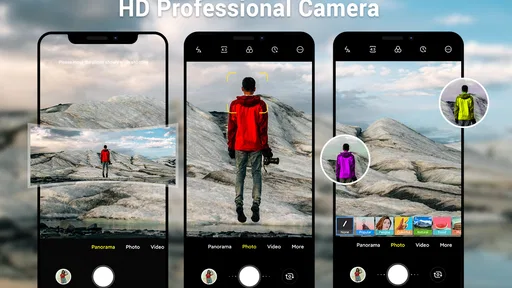
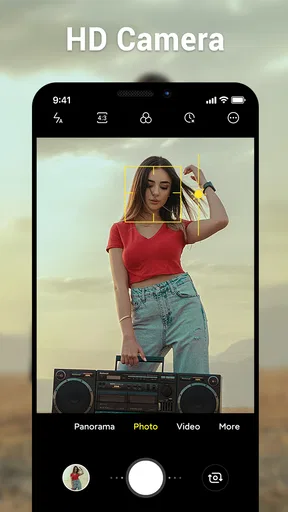
When I first opened Camera for Android, I was immediately struck by its clean and intuitive interface. It’s like the developers knew exactly what I needed without overwhelming me with unnecessary options. Everything is laid out in a way that makes it super easy to navigate, even if you’re not a tech wizard. The minimalist design is not only pleasing to the eye but also functional, allowing you to focus on capturing the perfect shot.
Features That Make a Difference
Now, let’s talk features because that’s where this app really shines. First up, the HDR mode. If you’re like me and enjoy capturing vibrant landscapes, this feature is a game-changer. It balances the light and dark areas beautifully, giving your photos that professional touch without needing to spend hours editing.
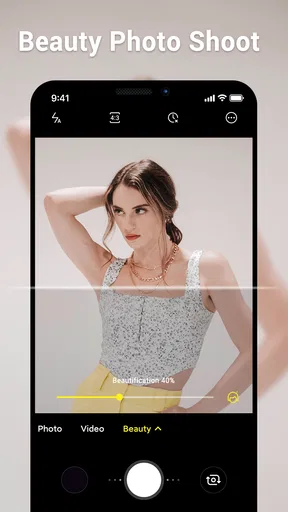
Another feature I absolutely adore is the portrait mode. It’s perfect for those Instagram-worthy selfies or portraits, where you want the background to blur out just right, making your subject pop. And let’s not forget the night mode. I’ve always struggled with low-light photography, but this app makes it almost too easy. The results are clear and crisp, even when the lighting isn’t on your side.
Customization at Your Fingertips
One thing I appreciate about Camera for Android is the level of customization it offers. You can tweak the settings to your heart’s content. Whether you want to adjust the ISO, shutter speed, or white balance, it’s all there. It’s perfect for photography enthusiasts who want more control over their shots. Plus, the app remembers your last settings, so you don’t have to reconfigure every time you open it.
A small habit makes those controls easier to live with: before putting the phone away, return to settings you are comfortable using for an unplanned photo. If I have been experimenting with exposure for a stationary scene, I do not want that experiment to dictate how I capture a sudden moment later. For a planned session, keeping a chosen setup can save time; for everyday use, a familiar baseline is more dependable.
Easy Sharing Options
Sharing your photos is a breeze with this app. Whether you’re uploading to social media or sending to friends, the integrated sharing options make the process seamless. You can even choose the resolution at which you want to share your photos, which is a nice touch, especially if you’re conscious about data usage or storage space.
That handoff is particularly handy after an ordinary day out: I can take a picture of a menu, a notice, or a keepsake, then send it while the context is still fresh. For something I may need to read later, I would prioritize legibility over a dramatic look and check that the text is in focus before sharing. A camera app can make sending an image convenient, but it cannot make a badly framed or blurred record useful.
Battery and Performance
Let’s be real; nobody wants an app that drains your battery faster than you can say "cheese." Thankfully, Camera for Android is pretty efficient in that department. I’ve used it for extended photo sessions, and it hasn’t caused any noticeable battery drain. Plus, it runs smoothly without any lag, which is crucial when you’re trying to capture those fleeting moments.
In everyday use, I would still keep the phone’s remaining battery in mind during a long outing, especially if I plan to take many pictures and share them as I go. The practical advantage here is a focused capture experience, not a reason to leave other preparations behind. If a moment matters, having enough space on the phone and checking that the lens is clean can matter just as much as choosing a mode.
How it fits beside other camera choices
Most Android phones already include a camera app, so installing another one is worthwhile only if its layout or controls feel better for you. The phone’s built-in option may be the better choice when it offers device-specific camera functions or a familiar workflow you already trust. This app’s appeal is the direct, uncomplicated approach and access to adjustments such as ISO, shutter speed, and white balance without turning the camera into a complicated project.
It also sits in a different lane from social camera apps, where filters and effects are often the main event, and from editing apps that focus on polishing a picture after capture. I would choose this one when I want to take the photo first and decide later whether it needs editing. If my goal is elaborate effects, extensive retouching, or a carefully managed photo library, I would use a tool built around those tasks instead.
Who will get the most from it
I can see this being a good fit for someone who takes frequent everyday photos and wants a camera interface that does not demand a learning session before use. It also suits a curious beginner who wants to experiment with manual controls one at a time: change white balance for a warm room, or try a different shutter speed on a still subject, then compare the result. The free entry point makes that sort of low-pressure trial easy, although individual in-app purchases range from $2.99 to $9.99 per item.
I would be more cautious if you need a specialized professional workflow, depend on a particular phone-maker feature, or want editing and organization in the same place. Likewise, anyone who prefers a fully automatic point-and-shoot routine may not use the manual settings enough to justify switching from the camera app already on their phone. The right choice depends less on the number of modes than on whether the controls help you get a shot you would otherwise miss.
Where the routine can stumble
The main friction is that camera choices cannot remove the limits of the scene. A dark room, a moving subject, or a phone that shifts during exposure can still produce a disappointing photo. HDR, portrait, and night modes each suit particular situations, so using them by habit can be counterproductive. I would take the simplest usable shot when speed matters, then experiment when the subject is still and I have time to check the result.
There is also a small but important gap between capturing and keeping: sharing a photo is not the same as building a reliable archive. If a picture is important, I would make sure it reaches whatever storage or backup routine I normally use rather than assuming that a quick share takes care of long-term organization. That extra step matters for family moments, travel records, or documents I may need to find again.
My take after using it
Ultimately, this is a camera app for people who value a quick start, useful shooting modes, and the option to take more control when a scene calls for it. Litter Penguin has kept the focus on taking pictures, and the app’s 50 million-plus installs and 4.8 average rating show that its straightforward appeal has reached a broad audience. It supports Android 6.0 and later, so the version of Android on your phone is worth checking before you decide to install it.
In conclusion, if you’re on the hunt for a powerful yet user-friendly camera app, Camera for Android is definitely worth checking out. It’s got all the bells and whistles you’d expect from a top-tier photography app, without the hefty price tag. Whether you’re a casual snapper or a budding photographer, this app has something to offer for everyone. So go ahead, give it a whirl, and see how it transforms your mobile photography game.
Pros
- User-friendly interface enhances experience.
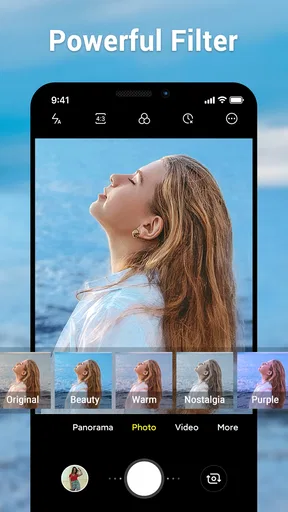
- Wide range of filters for creative photos.
- Supports high-resolution image capture.
- Seamless integration with social media.
- Fast processing and minimal lag.
Cons
- Limited manual controls for advanced users.
- Occasional ads can interrupt use.
- Some features locked behind paywall.
- Drains battery quickly during use.
- No support for RAW image format.
FAQs for Camera for Android
What features does Camera for Android offer?
Camera for Android provides a wide range of features to enhance your photography experience. It includes professional shooting modes like HDR, portrait, night mode, and more. Users can also access filters, editing tools, and manual controls for ISO, exposure, and white balance. This makes it ideal for both casual photographers and enthusiasts.
Is Camera for Android easy to use for beginners?
Yes, Camera for Android is designed with user-friendliness in mind. The interface is intuitive, with easy-to-navigate menus and clear icons. Beginners can quickly start capturing photos using the automatic mode, while tutorials and tips are available to help users explore more advanced features.
Does Camera for Android support high-resolution images and video recording?
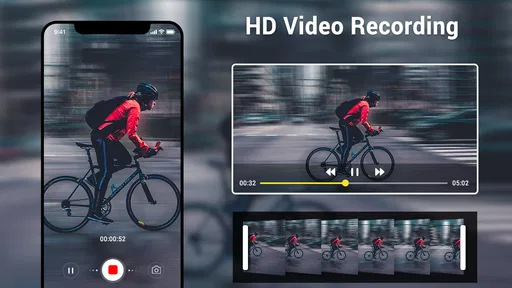
Absolutely, Camera for Android supports high-resolution image capture and 4K video recording, depending on your device's specifications. This ensures that users can produce clear, sharp images and videos, perfect for sharing on social media or storing precious memories.
Are there in-app purchases or ads in Camera for Android?
Camera for Android is generally free to download, but it may include optional in-app purchases to unlock premium features such as additional filters or advanced editing tools. Ads might be present in the free version, but they are typically minimal and non-intrusive, allowing for a smooth user experience.
How does Camera for Android handle privacy and permissions?
Camera for Android adheres to standard privacy protocols. It requires permissions to access your device's camera, storage, and microphone for functionality. However, it does not access personal data without explicit consent. Always review the permissions requested during installation to ensure your privacy preferences are met.


